Showing posts with label google. Show all posts
Showing posts with label google. Show all posts
Saturday, December 31, 2011

Download Official Facebook Messenger Client For Windows

Today Facebook released a beta version of its Official chat client for Windows.
Messenger is a Windows is a new, trial application that lets you use Facebook without being on www.facebook.com. While you surf the web or use other applications on your computer, you can:
We’re testing out a first version of the app with a small group of people. During this trial period, we plan on rolling out changes to the app and expect outages and periods of instability as we make improvements.
Saturday, December 24, 2011
Mozilla and Google Sign New Agreement for Default Search in Firefox

“Under this multi-year agreement, Google Search will continue to be the default search provider for hundreds of millions of Firefox users around the world,” said Gary Kovacs, CEO, Mozilla.
“Mozilla has been a valuable partner to Google over the years and we look forward to continuing this great partnership in the years to come,” said Alan Eustace, Senior Vice President of Search, Google.
The specific terms of this commercial agreement are subject to traditional confidentiality requirements, and we’re not at liberty to disclose them.
Saturday, December 17, 2011
Google begins rolling out ICS update to the GSM Nexus S
The Android Ice Cream Sandwich upgrade news continues but this time, it is not the Galaxy Nexus getting the update but its older sibling, the Nexus S.
Yes, Google has finally started rolling out the highly anticipated Ice Cream Sandwich update to Nexus S update. Google plans to gradually update all the Nexus S devices to the latest version of Android in the coming month. This version is actually the 4.0.3 that was just announced by Google and even the Galaxy Nexus is not running it at the moment.
There is one small problem, though. The update is only available to the GSM/UMTS version of the Nexus S for the moment and not the CDMA version used by Sprint customers in the US. When it will be out is not known at the moment.
The update will be made available over-the-air, so you can manually check on your phone or wait for the notification to appear. However, if your patience has run thin then you will be glad to know that the ICS ROM is available for download and install manually for those who know what they are doing. If you want to find out how to do that, click on the source link below.
Want to Manually Update Your Nexus S To 4.0.3, Here’s How 17 12 2011

So maybe your like me and your impatient. Who has time to wait for an update to come to them, when you can go get it yourself. Worry not my friends, we have the download file for you. As well as the walk through. Go on, you know the suspense is killing you.
This is only for the GSM version, And the T-Mobile version. If that’s not your phone, don’t follow through with these instructions, this isn’t an update for your phone. For all the rest of you that it does cover, read on:
Grab the OTA package here Rename it to something you will remember, like update.zip, or sweet.zip, whatever works best for you. Copy it over to the internal storage on your Nexus S. Power off, then hold volume up and power to reboot to the bootloader. Using the volume key to navigate, select recovery, then use the power button to confirm When you see the warning triangle and arrow, hold the power button and tap volume up. You’ll see a menu. From the menu, select “apply update from /sdcard”, and choose the file you named from the list. Let it do its thing and update your system, radio, and other partitions. When finished, choose “reboot system now” As long as you did everything correctly your phone should reboot, and you should be enjoying that sweet goodness called Ice Cream Sandwich. Source Android Central
Visit TalkAndroid for Android news, Android guides, and much more!
Kobo to be acquired by Japanese e-commerce giant for $315 million

Kobo, purveyor of eReaders and eBook software across a variety of platforms, announced on Tuesday that it will be acquired by Japan-based Rakuten. Rakuten will purchase 100% of outstanding shares of of Kobo for $315 million in cash. Based in Toronto, Ontario, Kobo was spun off of Canadian retailer Indigo in late 2009, and the company has struggled to compete against the likes of Amazon and Barnes & Noble in the eBook space. ”We are very excited about this next step,” said Rakuten CEO Hiroshi Mikitani in a statement. ”Kobo provides one of the world’s most communal eBook reading experiences with its innovative integration of social media, such as Facebook and Twitter; while Rakuten offers Kobo unparalleled opportunities to extend its reach through some of the world’s largest regional e-commerce companies, including Buy.com in the US, Tradoria in Germany, Rakuten Brazil, Rakuten Taiwan, Lekutian in China, TARAD in Thailand, and Rakuten Belanja Online in Indonesia, and of course, Rakuten Ichiba in Japan.” Kobo’s full press release follows below.
Adobe updates Flash to 11.1 with support for Ice Cream Sandwich

Adobe announced an update to its Flash Player on Friday that provides support for Android 4.0 (Ice Cream Sandwich). Prior to Friday, Flash was not officially supported by Android 4.0 on the
Samsung Galaxy Nexus, the only device currently running Google’s latest mobile operating system. Adobe noted a few known issues with its release, including one that does not prioritize the audio during an incoming call. That means any current Flash clip will play audio before and after the call is received. In addition, the “enter” key does not work in multi-line text input fields. Those sound like minor bugs for full Flash support, though. Galaxy Nexus owners, or anyone with Ice Cream Sandwich installed on a rooted device, should be able to find the Flash app in the Android Market now. Adobe announced in November that it would cease development of its mobile Flash Player, so this could be one of the last releases we see.
Monday, December 12, 2011
Kick-Ass! Web Android Market Now Allows App User Review Filtering By Device Model, Latest Version, And Specific Star Rating
Looks like the new Email Developer feature that the web Android Market received on Friday was just the icing on the cake! While it was nice to finally have the ability to contact developers without having to go through the device Market, it was still a pretty minor addition. Don't fret - Google was nowhere near being done - you can now:
filter user reviews by device model, currently limited to All and individual devices registered to your account.
filter user reviews by app version, currently limited to All or Latest
filter user reviews by specific star rating
Here, have a look (the sample app I used was Christmas HD, if you are curious):


The beauty is - you can combine filters and, for example, narrow down to only 1-star reviews made by users of HTC EVO 3D that used the latest version of the app.
Brilliant - it's exactly what we've been asking for, thanks, Google! The only thing I can think of is maybe expanding the version list to contain 4-5 previous versions, but it's probably not going to happen due to complexities that may arise from the multi-APK support.
Thanks for the tip, Daniel Monza!
filter user reviews by device model, currently limited to All and individual devices registered to your account.
filter user reviews by app version, currently limited to All or Latest
filter user reviews by specific star rating
Here, have a look (the sample app I used was Christmas HD, if you are curious):

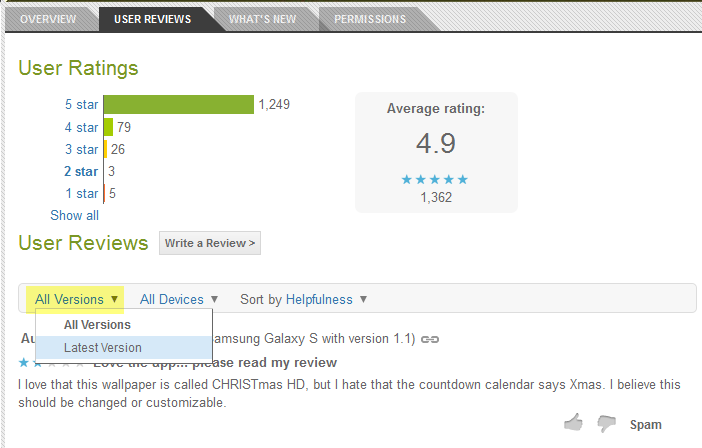

The beauty is - you can combine filters and, for example, narrow down to only 1-star reviews made by users of HTC EVO 3D that used the latest version of the app.
Brilliant - it's exactly what we've been asking for, thanks, Google! The only thing I can think of is maybe expanding the version list to contain 4-5 previous versions, but it's probably not going to happen due to complexities that may arise from the multi-APK support.
Thanks for the tip, Daniel Monza!
Friday, December 9, 2011
Fly Touch IV Android 2.2 10.2 inch 3G Internal GPS SIM reader

- CPU: Infomix ix220 1GMHz ARM11
- OS: Google Android 2.2
- RAM: 512MB DDR2
- Storage: 4GB
- Support TF card extend 16 max
- Display: 10.2 inch TFT LCD resistive touch panel 1024*600
- Webcam: 3.1 mega pixel
- Battery:7.4V/6000MAH
- Networking: Wifi 802.11 b/g
- Languages: Simple Chinese, Tradition Chinese, English, French, German, Italian, Japanese, Korean, Polish, Russian, Spanish
- 3G: Built-in
- GPS: Built-in
- Bluetooth: No
- Work time: 4-5hours
- Speakers: Yes
- MIC: Yes
- Input: 100-240V 50-60Hz
- Output: 9V 2500mA
- Audio format: MP3, WMA, WAV, APE, AAC, OGG
- Video format: MP4, AVI, MOV, VOB, RMVB, FLV, MKV, DAT
- Picture format: TXT, PDF, HTML, RTF, EPUB
- Office software: Word, Excel, PPT, PDF
- G-sensor: Yes
- Interface: USB*2, TF card slot*1, HDIM*1, Headphone jack*1, DC jack*1, Ethernet jack*1, SIM card slot*1
- Other application: My Pad, Dolphin Browser, Email, Music Player, Video Player, Gallery, Calendar, Calculator,Sound Recorder, Camera, Clock, Phone, Web TV, eReader, Settings, Wi-Fi Settings, ADSL Dialer, Ethernet Setting
- https://www.mediagadjets.com/computers-tablets/mobile-internet-device-tablet/10-tablet/tablet-pc-102.html#


 Posts
Posts


